An invitation-only platform connecting vetted investors, principals, owners & advisors
across high-value off-market assets.
🏠
Residential RE
🏢
Commercial RE
🚗
Collector Cars
🛥️
Yachts
✈️
Jets
🚁
Helicopters
🍷
Fine Wine
🥃
Rare Whisky
⌚
Watches
🪙
Gold Bullion
💼
Private Equity
🎨
Art
2,620+ events | 640 active members | Invite-only | Transaction fees: 1% (principal) / 20% of fee (representative)
The Team
Name
Role
Focus
Josh Benbow
Managing Director
Strategy, product, commercial
Nick Cox
Head of Commercial
Memberships, partnerships
Ralph Hazell
Head of KYC / AML
Identity verification, compliance
Tom McCollum
Real Estate Account Director
RE deal management, client relations
James Goldsztajn
Automotive Account Director
Cars, listing review, AM
Frankie
Operations Administrator
Daily activity monitoring, comms review
User Journey
The 6-step process from listing to deal
graph LR
A["1. Create Listing Buy or Sell side"] --> B["2. Members Respond Declare interest / facilitate"]
B --> C["3. Q&A Asset discussion"]
C --> D["4. Agreement Possible deal confirmed"]
D --> E["5. Introduction Buy ↔ Sell connected"]
E --> F["6. Deal Agreed Transaction arranged"]
style A fill:#1a1a2e,stroke:#c9a84c,color:#f5f5f5
style B fill:#1a1a2e,stroke:#c9a84c,color:#f5f5f5
style C fill:#1a1a2e,stroke:#c9a84c,color:#f5f5f5
style D fill:#1a1a2e,stroke:#c9a84c,color:#f5f5f5
style E fill:#1a1a2e,stroke:#c9a84c,color:#f5f5f5
style F fill:#1a1a2e,stroke:#c9a84c,color:#f5f5f5
Invite-only access control via unique membership codes
S3 infrastructure for document storage already in place
Account manager routing — auto-assigns by deal category
Strong testimonials — real, attributable quotes from active members
Growth story: Activity growing 3x YoY — 77 events/month (Jan 2025) → 230 events (Feb 2026). Peak: 307 events (Oct 2025). The challenge is converting introductions into closed deals and keeping transactions on-platform.
Platform Health Check
Live data from MongoDB & Sharetribe production — queried 4 March 2026
Events = tracked platform activities since Oct 2024: deal enquiries, new memberships, searches, introduction requests, and chat alerts.
640Active members (Sharetribe)
683Listings on platform
1,264Transactions / introductions
961Deal enquiries most common event
298Introduction requests growing 6x YoY
77 → 230Monthly events Jan 2025 → Feb 2026
Deal Completion & Retention
The core challenge is converting introductions into closed deals and ensuring transactions stay on-platform. 33 people started signup but abandoned — including nick@thedawsonpartnership.com (attempted twice). Knight Frank, 365 Aviation, Pygmalion Capital among recent dropouts.
Growth Inflecting Upward
Monthly events: 77 (Jan 2025) → 307 peak (Oct 2025) → 230 (Feb 2026). New memberships: 113 in Aug 2025, 32 in Feb 2026. Introduction requests surging: 50 in Feb 2026 (up from 8 in Apr 2025).
Budget tracking: ~£6.85B total search budget | ~£3.97B total sell budget | 623 new memberships | 565 searches created | 2,620 total events
Platform Insights
Activity trends tell a growth story — with one critical leak
An event = any tracked platform activity: deal enquiry, new membership, search created, introduction request, or chat alert. Tracked since Oct 2024.
Activity by Type (all time)
Activity
Count
Share
Deal Enquiries
961
36.7%
New Memberships
623
23.8%
Searches Created
565
21.6%
Introduction Requests
298
11.4%
Chat Alerts
173
6.6%
Total
2,620
100%
Intro Request Trend
Apr 2025: 8 → Jul: 9 → Oct: 41 → Jan 2026: 28 → Feb 2026: 50 6x growth in 10 months — introduction demand is accelerating
Monthly Event Volume
Month
Events
New Members
Jan 2025
77
—
Apr 2025
89
14
Jul 2025
175
58
Oct 2025
307
42
Dec 2025
209
44
Jan 2026
202
28
Feb 2026
230
32
Key insight: Platform is growing 3x year-on-year. The real challenge is converting introductions into closed deals and keeping transactions on-platform. Engagement is strong — now make deals cross the line.
Critical: Password Security
⚠ Severity: Critical
User passwords appear to be stored or visible in plain text within the system.
Flagged during live demo on 20 Feb — Josh confirmed: "That's not good."
⚠ .env.development Exposed
The development environment file contains all production secrets including:
Sharetribe Integration API keys
SendGrid API key
MongoDB connection string
AWS S3 credentials
Stripe secret key
Recommendation: Immediate secret rotation + password hashing audit. All .env files must be excluded from version control.
Critical: Hardcoded API Tokens
⚠ Tokens in Source Code
API tokens hardcoded directly in JavaScript files — not using environment variables.
HubSpot — getHubspotLeads.js:3
const accessToken = 'pat-eu1-••••••••';
// Personal Access Token
// Full CRM read access
Keep: HubSpot sync — but move to env vars. Goal: platform self-serves invite management, syncing to HubSpot automatically.
CueDesk — whatsapp.js:16
headers: {
  'Authorization': 'Bearer y8arylqx••••••••'
  // WhatsApp messaging token
  // Send to any member's phone
}
Goal: Remove spreadsheet dependency — the platform should self-serve invite management directly, eliminating manual tracking.
Member Invite System
Current Flow
sequenceDiagram
participant Admin
participant Sheet as Member Master Sheet
participant HS as HubSpot
participant User
Admin->>Sheet: Add name + generate code
Sheet->>HS: Push every 10 min
Admin->>User: Send prepopulated URL (email/WhatsApp)
User->>User: Click link → signup form
Note over User: Code validated against MongoDB MembershipId
Proposed Flow
sequenceDiagram
participant Admin
participant Platform as Parnexus Admin
participant User
Admin->>Platform: Generate invite (self-service)
Platform->>User: Auto-send branded invite
User->>Platform: Click → signup → KYC
Platform->>Admin: Dashboard shows status
Note over Platform: Real-time tracking No spreadsheet needed
Live data: 640 active members on platform. 33 signups abandoned mid-flow — including Knight Frank, 365 Aviation, Pygmalion Capital. The priority is helping deals close and stay on-platform.
CRM Sync & Hygiene
Josh: "Has not been good enough"
HubSpot CRM data is incomplete — important fields like "assets of focus" not being pushed from signup.
HubSpot leads filtered only by "Hot Lead" / "Warm Lead" status
Impact: Members with interests in unmapped categories never appear in HubSpot matching results.
Chat Interface UX
Josh: "Unclear" — "Not the easiest to use"
Frankie reviews all new activity daily across the platform's active transactions — a monitoring/triage pattern. No filtering, no priority queue — just scrolling and clicking.
Current Problems
No quick-scan view of conversations
Must open each transaction individually
"Last activity" is the only filter available
Can't tell if an asset was offered without reading full thread
No priority queue for introduction requests
No conversation status tags or labels
Proposed Improvements
Conversation summary preview (last 2 messages)
Status badges: New / Active / Intro Requested / Closed
Priority queue for introduction-ready conversations
Bulk actions for common operations
Search and filter by member, asset class, date
AI-assisted triage (flag conversations ready for intro)
KYC Modernisation: Didit.me
Current: Manual KYC
sequenceDiagram
participant User
participant Platform as Parnexus
participant S3 as AWS S3
participant Admin as Ralph (KYC)
participant ST as Sharetribe
User->>Platform: Upload passport photo
Platform->>S3: Store document
Platform->>ST: privateData.passportUploaded = true
Platform->>Admin: SendGrid notification
Note over Admin: Manual review (hours/days delay)
Admin->>ST: Set publicData.isVerified = true (via Sharetribe Console)
Note over ST: handleApproveUser cron (checks every 10 min)
ST->>User: Verification email
Proposed: Didit.me Automated
sequenceDiagram
participant User
participant Platform as Parnexus
participant Didit as Didit.me
participant ST as Sharetribe
User->>Platform: Click "Verify Identity"
Platform->>Didit: Redirect to hosted verification
Note over Didit: ID capture + validation Biometric liveness Face matching (1:1) AML/sanctions screening Deepfake detection
Didit->>Platform: Webhook: result
Platform->>ST: Auto-set isVerified = true
Platform->>User: Instant verification email
Note over Platform: Ralph handles exceptions only
Didit.me: Free tier (500/mo) | No contracts | GDPR + ISO 27001 | 48 languages | SDK/iframe integration
Signup Journey
graph TD
A["Receive Invite Link Unique membership code"] --> B["Click Link → Signup Page"]
B --> C["Enter Details Name, email, interests, region"]
C --> D{"Invite Code Valid?"}
D -->|"No / Already Used"| E["Rejected Code checked against MongoDB"]
D -->|Yes| F["Account Created sharetribeId linked to code"]
F --> G["Upload Passport Current: manual S3 upload"]
G --> H["KYC Review Proposed: Didit.me automated"]
H --> I{"Verified?"}
I -->|Yes| J["Full Access Granted Verification email sent"]
I -->|"No / Failed"| K["Manual Review Ralph handles exception"]
style A fill:#1a1a2e,stroke:#c9a84c,color:#f5f5f5
style B fill:#1a1a2e,stroke:#c9a84c,color:#f5f5f5
style C fill:#1a1a2e,stroke:#c9a84c,color:#f5f5f5
style D fill:#1a1a2e,stroke:#c9a84c,color:#f5f5f5
style E fill:#1a1a2e,stroke:#e74c3c,color:#f5f5f5
style F fill:#1a1a2e,stroke:#27ae60,color:#f5f5f5
style G fill:#1a1a2e,stroke:#c9a84c,color:#f5f5f5
style H fill:#1a1a2e,stroke:#3498db,color:#f5f5f5
style I fill:#1a1a2e,stroke:#c9a84c,color:#f5f5f5
style J fill:#1a1a2e,stroke:#27ae60,color:#f5f5f5
style K fill:#1a1a2e,stroke:#e74c3c,color:#f5f5f5
⚠ Known Bug: Location Matching
A listing with region: ["europe"] but no specific country set won't appear when users search for "Portugal". Frontend search sends pub_country: "has_any:portugal" — only matches explicit country, not region. Backend matching has the same issue: if listing countries and user countries don't cross, returns false — even when they share the same region.
graph TD
A["Member Creates Listing Buy-side or sell-side"] --> B["Admin Reviews James checks quality, budget spreads"]
B --> C{"Approved?"}
C -->|No| D["Request Changes e.g. narrow budget range"]
C -->|Yes| E["Listing Published"]
E --> F["approvedListings Cron Runs every 2 minutes"]
F --> G["Match Users"]
G --> G1["Category Match mainFocus = categoryLevel1"]
G1 --> G2["Size Match dealSizeBracket filter"]
G2 --> G3["Location Match Region/country/state + wildcards"]
G3 --> G4["Subcategory Match detailedFocus + sub-fields"]
G4 --> H["Notify Matched Users"]
H --> H1["SendGrid Email"]
H --> H2["WhatsApp via CueDesk"]
H --> H3["HubSpot Lead Match"]
style A fill:#1a1a2e,stroke:#c9a84c,color:#f5f5f5
style B fill:#1a1a2e,stroke:#c9a84c,color:#f5f5f5
style C fill:#1a1a2e,stroke:#c9a84c,color:#f5f5f5
style D fill:#1a1a2e,stroke:#e74c3c,color:#f5f5f5
style E fill:#1a1a2e,stroke:#27ae60,color:#f5f5f5
style F fill:#1a1a2e,stroke:#3498db,color:#f5f5f5
style G fill:#1a1a2e,stroke:#c9a84c,color:#f5f5f5
style G1 fill:#1a1a2e,stroke:#c9a84c,color:#f5f5f5
style G2 fill:#1a1a2e,stroke:#c9a84c,color:#f5f5f5
style G3 fill:#1a1a2e,stroke:#c9a84c,color:#f5f5f5
style G4 fill:#1a1a2e,stroke:#c9a84c,color:#f5f5f5
style H fill:#1a1a2e,stroke:#27ae60,color:#f5f5f5
style H1 fill:#1a1a2e,stroke:#27ae60,color:#f5f5f5
style H2 fill:#1a1a2e,stroke:#27ae60,color:#f5f5f5
style H3 fill:#1a1a2e,stroke:#27ae60,color:#f5f5f5
Transaction States
From transactionProcessInquiry.js — the actual state machine in production
Listing summary only — no seller identity or sensitive details
2. Q&A
Structured chat, asset questions
Seller reveals details incrementally as trust builds
3. Introduction
Buy ↔ Sell connected
Identities revealed, full asset info unlocked
4. Deal Room
Secure docs, milestones, negotiation
Data room with controlled access — watermarked, time-limited
5. Agreement
Terms confirmed, deal structure set
Full transparency between parties
6. Completion
Deal marked closed, feedback collected
Cash transfer off-platform (client-managed for now)
Key principle: Information is released stage-by-stage — not all at once.
Acquire.com charges a 6% closing fee only on success = aligned incentives.
They facilitate data rooms, escrow, and asset transfer plans. Parnexus can adopt the same model.
Steps 1–5 are on-platform. Step 6 happens entirely off-platform.
The platform stops being useful after introduction. Users move to WhatsApp, email, phone.
This is the root cause of the stickiness problem — not user behaviour.
The transaction state machine confirms this: "introduced" is a terminal state. There is literally no state for what happens next. The platform has no concept of a deal progressing, completing, or failing after introduction. The GAP model (previous slide) is the solution.
Features vs Real Problems
Requested Feature
Real Problem
Better Approach
Platform-only communication enforcement
Users leave after intro
Make the platform better than WhatsApp. Build deal rooms, voice/video, auto-NDAs. Make leaving pointless, not prohibited.
Popup + checkbox to stay on platform
No post-intro value
Post-intro deal tracking, milestone tracking, document management, data rooms. Give users a reason to stay.
Prevent forwardable PDFs
Info leaks off-platform
Watermarked, time-limited document access via secure viewer. Track who viewed what and when.
Button to report bad behaviour
No visibility into deals
Structured deal stages with check-ins. If a deal goes quiet, the platform knows and can intervene proactively.
Prevent duplicate transactions
Messy conversation state
Smart deduplication at inquiry time + clear conversation/deal separation in UX.
Mobile App + Face IDPhase 1
Login friction
Native mobile app with Face ID / biometric login + universal links from emails/WhatsApp. One tap from any notification opens directly in the app. Push notifications create daily engagement loops. Replaces the need for Magic Login on web.
Key insight: Platform-only enforcement won't work. The goal is to make the platform so useful that leaving is pointless — not to build walls. A native mobile app with push notifications and Face ID immediately improves daily engagement.
Introduction Management
Current: Manual Review
sequenceDiagram
participant User as Members
participant Chat as Platform Chat
participant Frankie
participant Admin
User->>Chat: Discuss asset
Note over Frankie: Daily review of all new activity
Frankie->>Chat: Read conversation
Frankie->>Frankie: Decide: intro worthy?
Frankie->>Admin: Grant introduction
Admin->>User: Introduction made
Note over User: 💔 Moves to WhatsApp
Note over Admin: No further visibility
Proposed: Smart Queue + Follow-up
sequenceDiagram
participant User as Members
participant Platform
participant AI as AI Triage
participant AM as Account Manager / Frankie
User->>Platform: Request introduction
Platform->>AI: Analyse conversation
alt AI-Approved (high confidence)
AI->>Platform: Auto-approve introduction
else Needs Human Review
AI->>AM: Priority queue + summary
AM->>Platform: Approve introduction
end
Platform->>User: Introduction + Deal Room
Platform->>User: 7-day check-in
Platform->>User: 14-day check-in
Platform->>User: 30-day check-in
Note over Platform: Full deal lifecycle visibility maintained
Two paths: Introduction approval either runs through an Account Manager or Frankie (with AI-generated summaries and priority queue), or is approved directly by AI when confidence is high. Human oversight always available.
AI Account Manager
Augment the team, keep lean, grow capability, not payroll bill.
graph TB
subgraph Input["Data Sources"]
I1["Conversations 1,264 txns"]
I2["Listings Buy + Sell side"]
I3["Member Profiles Interests, history"]
I4["HubSpot CRM Pipeline, status"]
end
subgraph AI["AI Account Manager"]
A1["Triage Inquiries Flag intro-ready conversations"]
A2["Proactive Suggestions 'Member X matches Listing Y'"]
A3["Daily Digest Prep Summarise activity for each AM"]
A4["Deal Health Monitor Flag stale or at-risk deals"]
end
subgraph Output["Actions"]
O1["Priority Queue → Frankie"]
O2["Match Alerts → Members Phase 2: prove with AMs first, then roll out to users"]
O3["AM Briefings → Team"]
O4["Intervention Triggers"]
end
I1 --> A1
I2 --> A2
I3 --> A2
I4 --> A3
I1 --> A4
A1 --> O1
A2 --> O2
A3 --> O3
A4 --> O4
style Input fill:#0d1b2a,stroke:#3498db,color:#f5f5f5
style AI fill:#0d1b2a,stroke:#c9a84c,color:#f5f5f5
style Output fill:#0d1b2a,stroke:#27ae60,color:#f5f5f5
AI Account Manager — Specification
MVP Scope
Conversational triage AND conversational summaries — both equally important. Classify conversations as: intro-ready, needs-info, stale, closed.
Generate AI summaries and briefing documents providing semantic insight into what chats are actually about. Surface a daily priority queue for Frankie.
Data Pipeline
Read-only Sharetribe Integration SDK → fetch recent transaction messages → LLM classifies + summarises → results stored in MongoDB → served via new API endpoint /api/triage-queue
LLM Approach
Claude API with structured output. Each conversation scored on: intent clarity, asset match quality, response recency, introduction readiness. Summaries generated at 24h, lifetime, and custom date ranges.
Integration Points
New cron job (triageConversations, every 30 min), new API endpoint for admin dashboard, new React component for queue view.
Staged Delivery (all Phase 1) Stage 1: Conversational triage + priority queue + AI summaries — 2–3 weeks Stage 2: Deal health monitoring + stale deal alerts + predictive scoring Stage 3: Proactive match suggestions, daily AM digest emails, briefing documents
Key Files server/cron/index.js (new cron), server/apiRouter.js (new endpoint),
new server/cron/triageConversations.js,
new src/containers/AdminTriagePage/
sequenceDiagram
participant Cron as Cron (30min)
participant SDK as Sharetribe SDK
participant AI as Claude API
participant DB as MongoDB
participant Dash as Admin Dashboard
Cron->>SDK: Fetch recent txn messages
SDK-->>Cron: Conversation data
Cron->>AI: Classify conversations
AI-->>Cron: Structured scores
Cron->>DB: Store triage results
Dash->>DB: Query priority queue
DB-->>Dash: Ranked conversations
Note over Dash: Frankie sees priority queue, not raw txn list
AI-First Ideas
AI Deal Matching
Go beyond category/size/region. Use NLP on listing descriptions, conversation tone, and deal history to find non-obvious matches. "This yacht buyer also bought art last quarter."
Conversational Deal Room
AI-moderated deal rooms that auto-generate summaries, track action items, flag when parties go quiet, and suggest next steps based on deal stage.
Voice-to-Deal-Note
Members record a voice note after a call. AI transcribes, extracts key details (price discussed, timeline, conditions), and updates the deal record automatically.
Predictive Deal Scoring
Train on 1,264 historical transactions. Predict likelihood of deal closure based on conversation patterns, response times, member history, and asset characteristics.
Smart Onboarding Concierge
AI guides new members through profile setup, suggests relevant listings based on stated interests, and proactively introduces them to high-match opportunities.
Mandatory Deal Confirmation
To close a deal room, both parties must definitively confirm: "Yes, a deal was done" or "No, a deal was not done." No silent exits. This forces accountability, confirms T&Cs weren't breached, and gives Parnexus definitive deal outcome data.
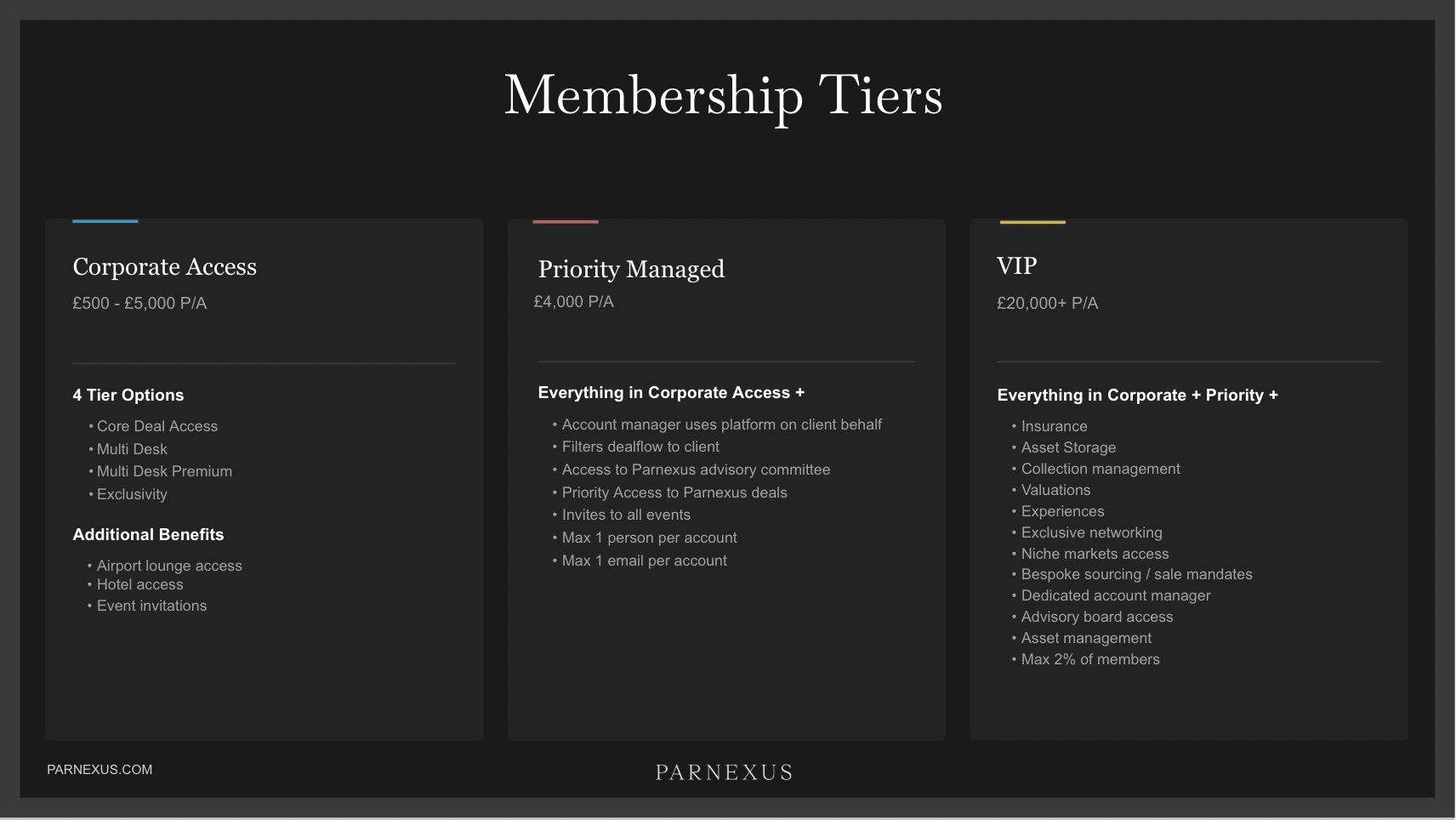
Membership Tiers
Tier
Price
Key Differentiator
Corporate Access
£500 – £5,000 p/a
4 sub-tiers: Core, Multi Desk, Multi Desk Premium, Exclusivity
Priority Managed
£4,000 p/a
AM uses platform on client's behalf, filters deal flow, advisory access
VIP
£20,000+ p/a
Insurance, storage, valuations, bespoke sourcing, max 2% of members
Prove the Model: Vertical-First
Pick ONE asset class. Build end-to-end. Prove traction. Then scale horizontally.
flowchart TB
subgraph Users["User Actions"]
direction LR
U1["Browse"] ~~~ U2["Create Listing"] ~~~ U3["Message"] ~~~ U4["Request Intro"] ~~~ U5["Passport"] ~~~ U6["Signup"]
end
subgraph API["Express API — 30+ endpoints"]
direction LR
A1["apiRouter.js"] ~~~ A2["Auth"]
A3["Transaction Engine"] ~~~ A4["Admin Notify"] ~~~ A5["S3 Upload"]
end
subgraph Cron["Scheduled Jobs"]
direction LR
C1["approvedListings 2 min"] ~~~ C2["dailyEmail 4 PM"] ~~~ C3["approveUser 10 min"]
C4["newsletter Sun 8 AM"] ~~~ C5["budget midnight"]
end
subgraph Store["Data Stores"]
direction LR
S1[("Sharetribe Users, Listings, Txns")]
S2[("MongoDB MembershipIds, Blogs")]
S3[("AWS S3 Documents")]
end
subgraph Ext["External Services"]
direction LR
E1["SendGrid"] ~~~ E2["HubSpot"] ~~~ E3["CueDesk"] ~~~ E4["Stripe"] ~~~ E5["Zapier"]
end
Users --> API
API --> Store
Cron --> Store
Cron --> Ext
API --> Ext
style Users fill:#0d1b2a,stroke:#c9a84c,color:#f5f5f5
style API fill:#0d1b2a,stroke:#c9a84c,color:#f5f5f5
style Cron fill:#0d1b2a,stroke:#3498db,color:#f5f5f5
style Store fill:#0d1b2a,stroke:#27ae60,color:#f5f5f5
style Ext fill:#0d1b2a,stroke:#9b59b6,color:#f5f5f5
Notification Flow
sequenceDiagram
participant Listing as New Listing
participant Cron as approvedListings (every 2 min)
participant Match as Matching Engine
participant ST as Sharetribe
participant HS as HubSpot
participant SG as SendGrid
participant CD as CueDesk
participant User as Matched Users
Listing->>ST: Published
Cron->>ST: Fetch approved listings
ST-->>Cron: Listing data
Cron->>Match: Filter users
Match->>ST: Query all users
ST-->>Match: User profiles + interests
Match->>Match: Category → Size → Location → Subcategory
Match->>HS: Filter HubSpot leads
HS-->>Match: Matching contacts
Match->>SG: Send email notifications
SG->>User: "New listing matches your criteria"
Match->>CD: Send WhatsApp via CueDesk
CD->>User: WhatsApp notification
Note over User: User opens platform, inquires on listing
Mobile & Desktop App Architecture
Native shells wrapping the existing web app — push notifications, Face ID, deep links
flowchart TB
subgraph Clients["Client Devices"]
direction LR
iOS["iOS App Capacitor + WKWebView"]
Android["Android App Capacitor + Chrome WebView"]
Desktop["Desktop App Electron + BrowserWindow"]
end
subgraph Server["Parnexus Server (Express.js)"]
direction LR
API["API Router + /push/register + /app-entry + /auth-check"]
Cron["Cron Jobs + messageNotifications (every 2 min)"]
Push["Push Service Firebase Admin SDK"]
end
subgraph Data["Data Stores"]
direction LR
ST[("Sharetribe Users, Listings, Txns")]
Mongo[("MongoDB + DeviceToken model")]
FCM["Firebase Cloud Messaging"]
end
iOS --> API
Android --> API
Desktop --> API
API --> ST
API --> Mongo
Cron --> ST
Cron --> Push
Push --> Mongo
Push --> FCM
FCM --> iOS
FCM --> Android
FCM --> Desktop
style Clients fill:#0d1b2a,stroke:#c9a84c,color:#f5f5f5
style Server fill:#0d1b2a,stroke:#c9a84c,color:#f5f5f5
style Data fill:#0d1b2a,stroke:#27ae60,color:#f5f5f5
Mobile & Desktop App Plan
Key deliverables for Phase 1
Technology
Component
Technology
Mobile (iOS + Android)
Capacitor — remote URL mode
Desktop (macOS + Windows)
Electron — BrowserWindow
Push notifications
Firebase Cloud Messaging
Biometric auth
capacitor-native-biometric
Splash screen
@capacitor/splash-screen + Lottie
Deep links
@capacitor/app + AASA/assetlinks
Why Mobile First?
Push notifications create daily engagement loops
Directly drives more introductions (the highest-value action)
Face ID + universal links replace Magic Login
Submit to stores early, iterate over time
Push Notification Triggers
Event
Notification
New matching listing
"X new listings match your criteria"
New message received
"New message from [Name]"
Introduction approved
"Your introduction has been confirmed"
Server-Side Additions
DeviceToken model (MongoDB)
POST /api/push/register — save token on login
pushNotification service (Firebase Admin SDK)
messageNotifications cron (polls every 2 min)
AASA + assetlinks.json (universal links)
Latency: Message notifications within ~2 minutes. Listing match notifications at 4 PM daily (existing cron).
Admin Mission Control
Replace Sharetribe Console + spreadsheets with a unified admin dashboard
Overview & Alerts
Pending listings + introductions banners, stale conversation alerts, 24h activity feed with AI summaries, conversion funnel, login/listing charts
Introduction Approval
Approve/reject introductions directly from dashboard. AI-summarised conversation context, both parties' KYC status, time since request. No Sharetribe Console needed.
Conversations + AI
Every conversation gets 3 AI summary modes: 24h (pre-computed), Lifetime (pre-computed), Custom date range (on-demand via Claude). Full message thread with proper left/right alignment.
Listings & Match Reports
Filter by state (pending/published/draft/closed). When listing is approved, see which users were matched and notified. Pending listings visually highlighted.
Users & Profiles
Card grid with company, assets of focus as coloured pills, verification status, account manager assignment, last online. Formatted profiles — no raw JSON.
Extends existing /admin-dashboard route. New Express admin router with requireAdmin middleware. Data from ShareTribe Integration SDK + MongoDB. AI summaries via Claude Sonnet 4.6 (OpenRouter).
Key Discovery: Introduction Flow
Introduction requests follow: free-inquiry → meeting-requested → introduced. Admin approval is an operator-only transition. Dashboard brings this in-app with full conversation context.
Application Flow
Replace "signups" with "applications" — user applies, completes KYC, admin reviews, payment on approval
sequenceDiagram
participant User
participant Platform as Parnexus
participant Didit as Didit.me (KYC)
participant Stripe
participant Admin
User->>Platform: Apply for membership
Note over Platform: Collect profile, interests, company, assets of focus
Platform->>Didit: KYC verification
Didit-->>Platform: KYC result (pass/fail)
Platform->>Admin: Application received (dashboard notification)
Note over Admin: Review profile, KYC status, verify legitimacy
Admin->>Platform: Approve / Decline
alt Approved
Platform->>User: Welcome email + payment link
User->>Stripe: Membership payment
Stripe-->>Platform: Payment confirmed
Platform->>User: Full access granted
else Declined
Platform->>User: Application declined email
end
Key shift: Membership becomes a gated application, not an open signup with an invite code. KYC is completed upfront as part of the initial application to verify identity early. Payment is taken after approval — as part of the welcome and final approvals step. This replaces the invite-code-in-a-spreadsheet model entirely.
Access Requirements
Service
Status
Why Needed
GitHub Repository
HAVE
Source code access, PRs, deployments
Member Master Spreadsheet
HAVE
Understand current invite tracking, migration to self-serve
MongoDB Atlas Admin
HAVE
MembershipId management, schema changes
Sharetribe Console
HAVE
User/listing admin, transaction process config
Sharetribe Integration API Keys
HAVE
Backend SDK operations
SendGrid Account
NEED
Email template management, deliverability
AWS IAM (S3)
NEED
Document storage, passport uploads
HubSpot Admin
HAVE
CRM fields, pipeline config, token rotation
CueDesk Admin
NEED
WhatsApp templates, token rotation
Google Workspace / Sheets
NEED
Access to shared docs, spreadsheet migration
Domain / DNS Access
NEED
Email deliverability (SPF/DKIM), SendGrid setup
Deployment Platform
HAVE
Heroku/Render/Vercel — deploy access, CI/CD
Didit.me Account
NEED
KYC integration setup
Sharetribe FTW Documentation
NEED
Platform-specific admin docs and guides
Analytics Platform
NEED
GA / Mixpanel — usage tracking (or set up new)
Sentry Project
NEED
Error monitoring (or set up new)
Stripe Dashboard
NEED
Payment configuration, webhooks
Zapier Account
NEED
Automation workflows
Design Files (Figma etc.)
NEED
Existing design assets and brand guidelines
CueDesk WhatsApp Business Docs
NEED
WhatsApp Business setup, template approval
Proposed Engagement
PHASE 1
Mobile & Desktop App
~14 weeks
▸ Capacitor mobile app (iOS + Android)
▸ Electron desktop app (macOS + Windows)
▸ Push notifications (Firebase + server)
▸ Face ID / biometric authentication
▸ Universal links / deep links
▸ Animated splash + login-first flow
▸ App Store + Play Store submission ▸ Mission Control foundation (parallel)
▸ GAP + deal rooms + NDA gating
▸ Membership tiers + payments
▸ AI for users, API integrations
▸ Referral system, trust scoring
gantt
title Parallel Execution Timeline (24 weeks)
dateFormat YYYY-MM-DD
tickInterval 2week
section Phase 1
Mobile and Desktop App :active, p1, 2026-04-06, 98d
Mission Control :active, mc, 2026-05-18, 2026-08-24
section Phase 2
Foundation AI and Engagement :p2, 2026-06-15, 70d
section Phase 3
Stretch Goals :p3, 2026-08-17, 28d
Investment & Growth
What this software achieves — and what comes next commercially
What This Builds
This programme of work platforms Parnexus — transforming it from a set of tools into a scalable business platform. We put in all the foundations so the business can grow bigger than it currently is, quicker than it currently is. Security, data integrity, AI-powered operations, deal lifecycle management, and a modern admin dashboard — these are the building blocks of a company that can scale without scaling headcount.
Commercial Outcome
With these foundations in place, the business is positioned for either: A. A subsequent raise at a significantly higher valuation (~2x, in the region of £6M), or B. Sufficient commercial traction that a further raise becomes optional.
Recommendation: Raise Now
Valuation: £3,000,000 Raise: £150,000 under the SEIS scheme Urgency: Limited window to utilise SEIS eligibility — time-sensitive
SEIS (Seed Enterprise Investment Scheme) provides significant tax relief to investors — 50% income tax relief, CGT exemption, and loss relief. Parnexus has a limited amount of time remaining to use SEIS, making this the optimal moment to raise.
Growth Story
640 members, 3x YoY activity growth, introduction requests up 6x, £6.85B in search budgets tracked. The platform works — this investment makes it scale.
Questions & Next Steps
Immediate Actions:
1. Agree commercial terms
2. Provision access (see Access Requirements slide)